Project Gallery
Explore Modern Login & Registration Page in detail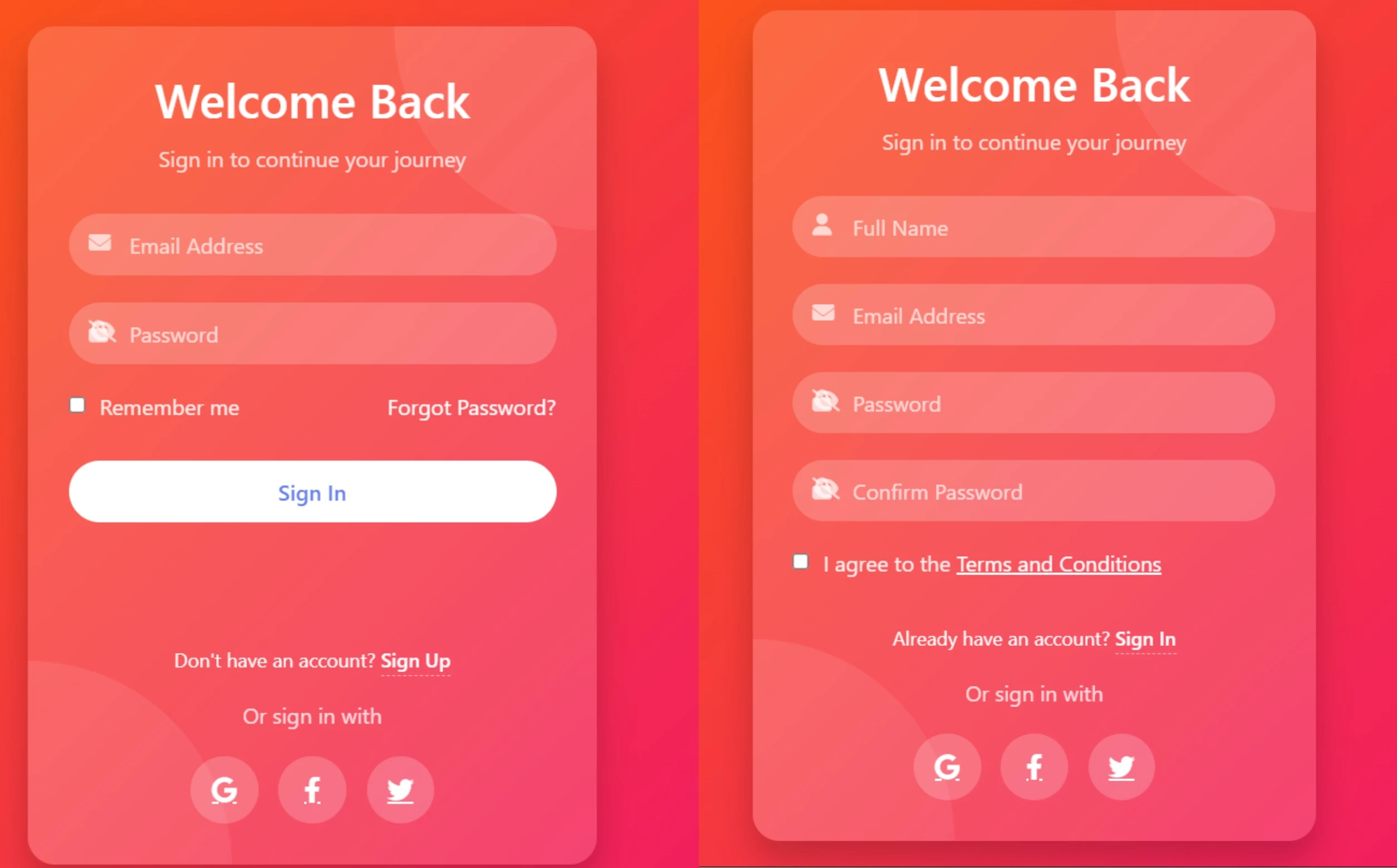
Project Overview
Modern Login & Registration Page
Project Description
Our design combines modern glassmorphism aesthetics with a sleek, user-friendly interface. The frosted glass effect, semi-transparent elements, and subtle shadows create a sense of depth and elegance. Smooth transitions ensure a seamless switch between login and registration forms, while interactive elements feature fluid hover effects for an engaging experience.
With rounded input fields, built-in icons, password visibility toggles, and social login options, the UI feels both intuitive and functional. The clean, minimalist layout adapts to all screen sizes, ensuring mobile responsiveness without compromising style. A vibrant gradient background and decorative circles add a touch of creativity, while a consistent color scheme ties everything together for a professional and modern look.
HTML
<!DOCTYPE html>
<html lang="en">
<head>
    <meta charset="UTF-8">
    <meta name="viewport" content="width=device-width, initial-scale=1.0">
    <title>Modern Auth UI</title>
    <link rel="stylesheet" href="https://cdnjs.cloudflare.com/ajax/libs/font-awesome/6.4.0/css/all.min.css">

</head>
<body>
    <div class="auth-container">
        <!-- Decorative elements -->
        <div class="decoration decoration-circle circle-1"></div>
        <div class="decoration decoration-circle circle-2"></div>

        <div class="auth-header">
            <h1>Welcome Back</h1>
            <p>Sign in to continue your journey</p>
        </div>

        <div class="form-container" id="formContainer">
            <!-- Login Form -->
            <form class="auth-form login-form">
                <div class="form-group">
                    <i class="fas fa-envelope"></i>
                    <input type="email" class="form-control" placeholder="Email Address" required>
                </div>

                <div class="form-group">
                    <i class="fas fa-lock"></i>
                    <input type="password" class="form-control" placeholder="Password" required id="loginPassword">
                    <i class="fas fa-eye-slash password-toggle" id="loginPasswordToggle"></i>
                </div>

                <div class="checkbox-group">
                    <input type="checkbox" id="rememberMe">
                    <label for="rememberMe">Remember me</label>
                    <a href="#" style="margin-left: auto; color: white; text-decoration: none;">Forgot Password?</a>
                </div>

                <button type="submit" class="btn">Sign In</button>
            </form>

            <!-- Register Form -->
            <form class="auth-form register-form">
                <div class="form-group">
                    <i class="fas fa-user"></i>
                    <input type="text" class="form-control" placeholder="Full Name" required>
                </div>

                <div class="form-group">
                    <i class="fas fa-envelope"></i>
                    <input type="email" class="form-control" placeholder="Email Address" required>
                </div>

                <div class="form-group">
                    <i class="fas fa-lock"></i>
                    <input type="password" class="form-control" placeholder="Password" required id="registerPassword">
                    <i class="fas fa-eye-slash password-toggle" id="registerPasswordToggle"></i>
                </div>

                <div class="form-group">
                    <i class="fas fa-lock"></i>
                    <input type="password" class="form-control" placeholder="Confirm Password" required id="registerConfirmPassword">
                    <i class="fas fa-eye-slash password-toggle" id="registerConfirmPasswordToggle"></i>
                </div>

                <div class="checkbox-group">
                    <input type="checkbox" id="termsAgree">
                    <label for="termsAgree">I agree to the <a href="#" style="color: white;">Terms and Conditions</a></label>
                </div>

                <button type="submit" class="btn">Create Account</button>
            </form>
        </div>

        <div class="switch-form">
            <p>Don't have an account? <a id="showRegister">Sign Up</a></p>
            <p id="showLoginText" style="display: none;">Already have an account? <a id="showLogin">Sign In</a></p>
        </div>

        <div class="auth-footer">
            <p>Or sign in with</p>
            <div class="social-auth">
                <a href="#" class="social-btn"><i class="fab fa-google"></i></a>
                <a href="#" class="social-btn"><i class="fab fa-facebook-f"></i></a>
                <a href="#" class="social-btn"><i class="fab fa-twitter"></i></a>
            </div>
        </div>
    </div>


</body>
</html>
CSS
<style>
        * {
            margin: 0;
            padding: 0;
            box-sizing: border-box;
            font-family: 'Segoe UI', Tahoma, Geneva, Verdana, sans-serif;
        }

        body {
          background: linear-gradient(135deg, #ff6a00 0%, #ee0979 100%);

            min-height: 100vh;
            display: flex;
            align-items: center;
            justify-content: center;
            padding: 20px;
        }

        .auth-container {
            width: 100%;
            max-width: 420px;
            background: rgba(255, 255, 255, 0.15);
            backdrop-filter: blur(10px);
            border-radius: 20px;
            padding: 30px;
            box-shadow: 0 15px 25px rgba(0, 0, 0, 0.2);
            overflow: hidden;
            position: relative;
        }

        .auth-header {
            text-align: center;
            margin-bottom: 30px;
        }

        .auth-header h1 {
            color: white;
            font-weight: 600;
            font-size: 2.2rem;
            margin-bottom: 10px;
        }

        .auth-header p {
            color: rgba(255, 255, 255, 0.8);
            font-size: 1rem;
        }

        .form-container {
            position: relative;
            height: 300px;
            overflow: hidden;
        }

        .auth-form {
            position: absolute;
            width: 100%;
            transition: transform 0.6s ease-in-out;
        }

        .login-form {
            transform: translateX(0);
        }

        .register-form {
            transform: translateX(100%);
        }

        .form-container.active .login-form {
            transform: translateX(-100%);
        }

        .form-container.active .register-form {
            transform: translateX(0);
        }

        .form-group {
            margin-bottom: 20px;
            position: relative;
        }

        .form-group i {
            position: absolute;
            left: 15px;
            top: 14px;
            color: rgba(255, 255, 255, 0.7);
        }

        .form-control {
            width: 100%;
            padding: 12px 15px 12px 45px;
            background: rgba(255, 255, 255, 0.2);
            border: none;
            border-radius: 50px;
            color: white;
            font-size: 1rem;
            outline: none;
            transition: all 0.3s ease;
        }

        .form-control::placeholder {
            color: rgba(255, 255, 255, 0.7);
        }

        .form-control:focus {
            background: rgba(255, 255, 255, 0.3);
            box-shadow: 0 0 0 2px rgba(255, 255, 255, 0.5);
        }

        .password-toggle {
            position: absolute;
            right: 15px;
            top: 14px;
            color: rgba(255, 255, 255, 0.7);
            cursor: pointer;
        }

        .btn {
            width: 100%;
            padding: 12px;
            border: none;
            border-radius: 50px;
            background: white;
            color: #667eea;
            font-size: 1rem;
            font-weight: 600;
            cursor: pointer;
            transition: all 0.3s ease;
            margin-top: 10px;
        }

        .btn:hover {
            background: #f8f9fa;
            transform: translateY(-2px);
            box-shadow: 0 5px 15px rgba(0, 0, 0, 0.1);
        }

        .auth-footer {
            text-align: center;
            margin-top: 20px;
        }

        .auth-footer p {
            color: rgba(255, 255, 255, 0.8);
            margin-bottom: 15px;
        }

        .social-auth {
            display: flex;
            justify-content: center;
            gap: 15px;
            margin-top: 20px;
        }

        .social-btn {
            width: 50px;
            height: 50px;
            border-radius: 50%;
            background: rgba(255, 255, 255, 0.2);
            display: flex;
            align-items: center;
            justify-content: center;
            color: white;
            font-size: 1.2rem;
            transition: all 0.3s ease;
        }

        .social-btn:hover {
            background: rgba(255, 255, 255, 0.3);
            transform: translateY(-3px);
        }

        .switch-form {
            color: white;
            text-align: center;
            margin-top: 20px;
            font-size: 0.9rem;
        }

        .switch-form a {
            color: white;
            font-weight: 600;
            text-decoration: none;
            cursor: pointer;
            transition: all 0.3s ease;
            border-bottom: 1px dashed rgba(255, 255, 255, 0.5);
            padding-bottom: 2px;
        }

        .switch-form a:hover {
            border-bottom: 1px solid white;
        }

        .checkbox-group {
            display: flex;
            align-items: center;
            margin-bottom: 20px;
            color: rgba(255, 255, 255, 0.9);
        }

        .checkbox-group input {
            margin-right: 10px;
            accent-color: white;
        }

        @media (max-width: 480px) {
            .auth-container {
                padding: 20px;
            }

            .auth-header h1 {
                font-size: 1.8rem;
            }
        }

        .decoration {
            position: absolute;
            z-index: -1;
        }

        .decoration-circle {
            width: 300px;
            height: 300px;
            border-radius: 50%;
            background: linear-gradient(135deg, rgba(255, 255, 255, 0.1) 0%, rgba(255, 255, 255, 0.05) 100%);
        }

        .circle-1 {
            top: -150px;
            right: -150px;
        }

        .circle-2 {
            bottom: -150px;
            left: -150px;
        }
    </style>
JavaScript
<script>
        document.addEventListener('DOMContentLoaded', function() {
            const formContainer = document.getElementById('formContainer');
            const showRegister = document.getElementById('showRegister');
            const showLogin = document.getElementById('showLogin');
            const showLoginText = document.getElementById('showLoginText');
            const loginPasswordToggle = document.getElementById('loginPasswordToggle');
            const loginPassword = document.getElementById('loginPassword');
            const registerPasswordToggle = document.getElementById('registerPasswordToggle');
            const registerPassword = document.getElementById('registerPassword');
            const registerConfirmPasswordToggle = document.getElementById('registerConfirmPasswordToggle');
            const registerConfirmPassword = document.getElementById('registerConfirmPassword');

            // Toggle between forms
            showRegister.addEventListener('click', function() {
                formContainer.classList.add('active');
                showLoginText.style.display = 'block';
                showRegister.parentElement.style.display = 'none';
            });

            showLogin.addEventListener('click', function() {
                formContainer.classList.remove('active');
                showLoginText.style.display = 'none';
                showRegister.parentElement.style.display = 'block';
            });

            // Password toggle functionality
            loginPasswordToggle.addEventListener('click', function() {
                if (loginPassword.type === 'password') {
                    loginPassword.type = 'text';
                    loginPasswordToggle.classList.remove('fa-eye-slash');
                    loginPasswordToggle.classList.add('fa-eye');
                } else {
                    loginPassword.type = 'password';
                    loginPasswordToggle.classList.remove('fa-eye');
                    loginPasswordToggle.classList.add('fa-eye-slash');
                }
            });

            registerPasswordToggle.addEventListener('click', function() {
                if (registerPassword.type === 'password') {
                    registerPassword.type = 'text';
                    registerPasswordToggle.classList.remove('fa-eye-slash');
                    registerPasswordToggle.classList.add('fa-eye');
                } else {
                    registerPassword.type = 'password';
                    registerPasswordToggle.classList.remove('fa-eye');
                    registerPasswordToggle.classList.add('fa-eye-slash');
                }
            });

            registerConfirmPasswordToggle.addEventListener('click', function() {
                if (registerConfirmPassword.type === 'password') {
                    registerConfirmPassword.type = 'text';
                    registerConfirmPasswordToggle.classList.remove('fa-eye-slash');
                    registerConfirmPasswordToggle.classList.add('fa-eye');
                } else {
                    registerConfirmPassword.type = 'password';
                    registerConfirmPasswordToggle.classList.remove('fa-eye');
                    registerConfirmPasswordToggle.classList.add('fa-eye-slash');
                }
            });

            // Form validation
            const loginForm = document.querySelector('.login-form');
            const registerForm = document.querySelector('.register-form');

            loginForm.addEventListener('submit', function(e) {
                e.preventDefault();
                // Add your login logic here
                alert('Login functionality would be implemented here!');
            });

            registerForm.addEventListener('submit', function(e) {
                e.preventDefault();
                // Add your registration logic here
                alert('Registration functionality would be implemented here!');
            });
        });
    </script>